
Subcontractor workspace
The Subcontract workspace manages work given to subcontractors, from the agreed work to the bill:
Work Order → Measurement Book → Subcontractor Bill → Purchase Invoice
The agreed work and rates are recorded in a Work Order. As the subcontractor completes the work, the quantity done is measured on site and certified in a Measurement Book. Certified quantities are billed in a Subcontractor Bill, which creates the ERPNext Purchase Invoice for accounting. Client Bills record what is claimed from the client for the same work, so you can compare what you claim with what you pay.
Open it from: Sidebar → Subcontract
What’s in the workspace
| Link | What it opens |
|---|---|
| Subcontractor Dashboard | A live summary of open commitments, billing and certified measurements |
| Subcontractors | The subcontractor master and each subcontractor’s work orders |
| Work Orders | Work given to subcontractors, with agreed quantities and rates |
| Measurement Books | Quantities of work completed, measured on site |
| Subcontractor Bills | Running bills for certified work, and direct bills |
| Client Bills | Interim payment certificates claimed from the client |
Reports
| Report | What it shows |
|---|---|
| Work Order Register | Every work order across projects, with status and billed to date |
| Measurement Book Register | Site measurements certified by the QS, which feed subcontractor bill quantities |
| Subcontractor Bill Register | Running subcontractor bills, with retention and net payable totals |
| Client Bill Register | Interim payment certificates claimed from the client, with retention held |
| Subcontractor Ledger | For each subcontractor: work orders committed, bills paid and retention held |
| Cost code variance | Planned vs Committed vs Actual cost for each BOQ group code |
Note: You see only the links, reports and figures your role has permission for. See Roles and permissions.
Subcontractor Dashboard
The dashboard shows subcontract commitments and billing at a glance. It updates as documents are submitted.
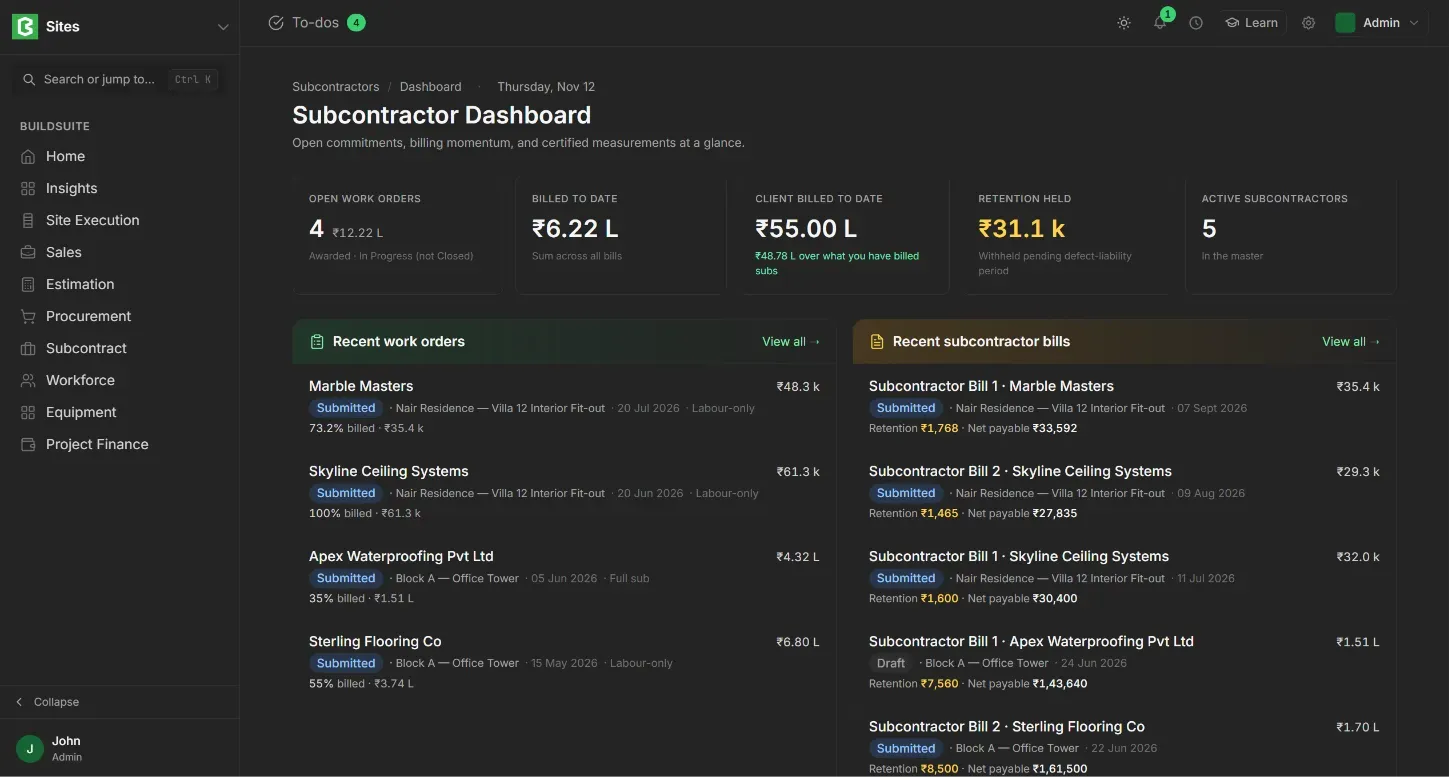
Summary cards
- Open Work Orders: the number and total value of work orders that are not yet closed.
- Billed to Date: the total of all subcontractor bills.
- Client Billed to Date: the total claimed from the client, and how much more that is than you’ve billed to subcontractors.
- Retention Held: the amount held back from subcontractors until the defect-liability period ends.
- Active Subcontractors: the number of active subcontractors in the master.
Recent lists
- Recent work orders: subcontractor, status, project, date, type, % billed and amount billed.
- Recent subcontractor bills: bill number, subcontractor, status, project, date, retention and net payable.
- Recent Measurement Books: MB ID, status, project, work order, date, number of entries and total measured.
Click View all on any list to open the full list.