
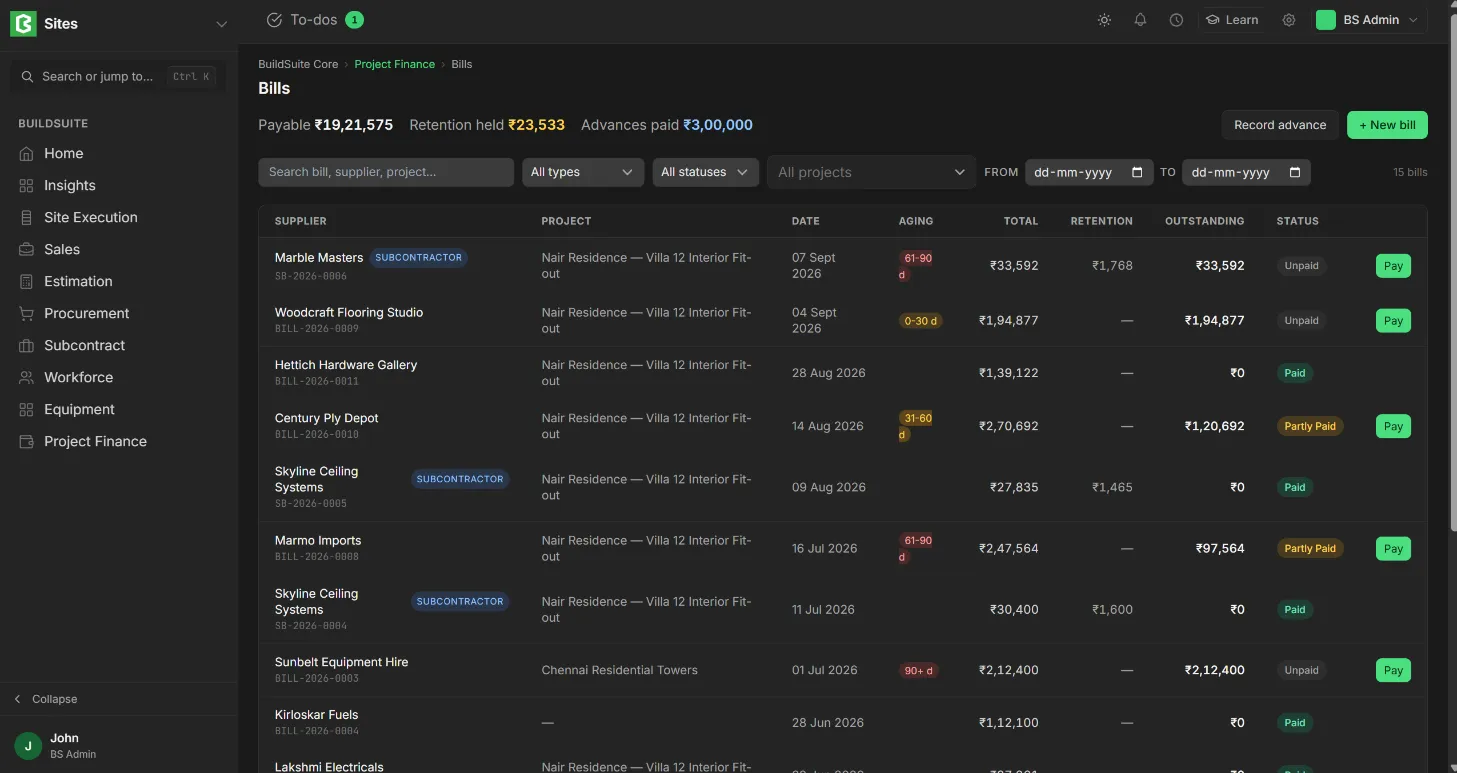
Bills lists everything you owe: supplier bills (ERPNext Purchase Invoices) and subcontractor bills, so you can see what’s due and pay it.
Open it from: Project Finance → Bills
At the top, the list shows the total Payable, the Retention held and the Advances paid. Each row shows the bill, party (subcontractors are tagged), project, date, due date, aging, total, outstanding amount, retention and status. You can filter by type (Supplier or Subcontractor), status and project.
- Status: Draft, Unpaid, Partly Paid or Paid.
Create a bill
Click + New bill and choose:
- Supplier bill: a direct purchase from a supplier (materials or services). It is an ERPNext Purchase Invoice.
- Subcontractor bill: an RA (work-done) bill against a subcontractor work order, with retention. See Subcontractor bills.
Supplier bills raised against purchase orders are created in Procurement. See Supplier Bill.
- Click Record advance to pay a supplier or subcontractor in advance. The advance can be linked to a later bill.
Last updated 1 day ago
Was this helpful?