
The Schedule is a Gantt chart of the project's tasks and stages. It is a view of existing records, not a separate document: tasks and stages appear as bars along their planned dates, with their dependencies and progress.
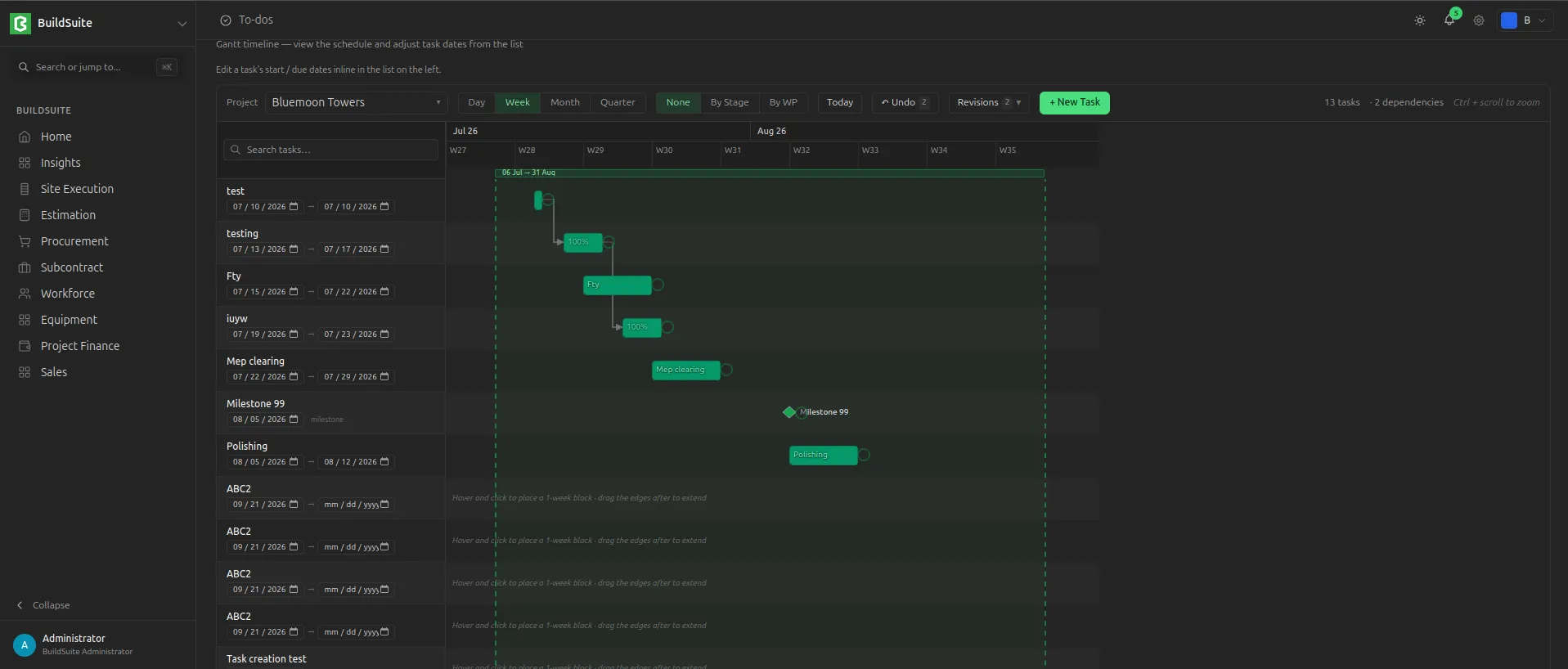 Schedule of a project
Summary rows
Tasks are grouped under summary rows. A summary row shows the earliest start and latest end of the rows under it, and their combined progress. Summary rows can be collapsed and expanded.
Task dependencies
A dependency links two tasks and controls their order.
| Type | Meaning |
| Finish-to-Start (FS) | The second task starts after the first finishes |
| Start-to-Start (SS) | The second task starts when the first starts |
| Finish-to-Finish (FF) | The second task finishes when the first finishes |
Lag adds a waiting time between the two tasks; lead lets them overlap. The system checks each dependency and refuses one that would create a loop (circular dependency).
Rescheduling
When a task's dates change, the tasks that depend on it can be handled in two ways:
| Mode | What happens |
| Flag only | Affected tasks are highlighted for review; their dates do not change |
| Cascade | Affected tasks move automatically, keeping their dependency types and lag |
Delays
The schedule marks tasks that are past their planned end date and not complete (overdue), and stages that are running behind their planned end date (stage slip).